Stay Tax-Ready Year-Round
Without Lifting a Finger
A plug-and-play system that pulls receipts from Gmail, logs them in a Google Sheet, and stores them in Drive so you’re organized and audit-ready.
If you’re running your own business, you’re probably wearing 47 hats and “receipt tracker” isn’t the one you enjoy. This system quietly pulls receipts from your inbox, files them neatly, and logs key info in a spreadsheet…so you never have to dig through emails or guess what that $78 charge was again.
The Problem
Keeping receipts is easy to forget. Finding them later? Not so much.
If you’re like most solopreneurs and small business owners, tracking expenses isn’t your strong suit — and that’s not your fault. You’ve got client work, content, launches, admin… and somehow, you’re expected to log every tiny charge?
So receipts pile up. Inbox searches fail. And tax season becomes a scramble.
You waste hours chasing old emails, guessing what charges were for, or praying your CPA doesn’t ask too many questions.
Or worse…you miss deductions that could’ve saved you hundreds (or thousands).
☑️The Solution
Your Receipt Auto-Tracker
This plug-and-play system does what most solopreneurs & small business owners don’t have time for. It automatically finds receipts in your Gmail inbox, labels them, stores them in Google Drive, and logs key details in a clean, organized Google Sheet without you ever lifting a finger.
✅ No apps to check
✅ No more digging through emails
✅ No more guessing at tax time
Just a simple system that works quietly in the background, so you stay organized, audit-ready, and stress-free all year long.
What Makes it Different?
- Fast setup with a step-by-step guide for connecting your accounts (even if you’re not techy)
- Smart filters that auto-tag receipts in Gmail as they come in
- Custom Google Sheet that keeps your records clean and CPA-ready
- Private & secure – receipt information stays in your Drive
What You’ll Get (and Why You’ll Love it)
✅ Stress-Free Tax Time
Everything’s already logged and stored. Just hand it over to your CPA (or look over it at tax time).
✅ Save Time All Year
This system handles it for you in the background — 24/7.
✅ Never Lose a Receipt Again
Receipts pulled from your inbox, labelled, and saved where they belong.
✅ Know Exactly What That Charge Was
Clear, dated entries in your Google Sheet.
✅ DIY Setup (No Tech Overwhelm)
Just follow the steps in approximately 10 minutes.
What’s Inside?
- Step-by-Step Setup Guide
- Ready-to-Use Google Sheet Template
- Pre-written Gmail Filters
- Copy-paste Google Script
All for just $27!
What it Looks Like
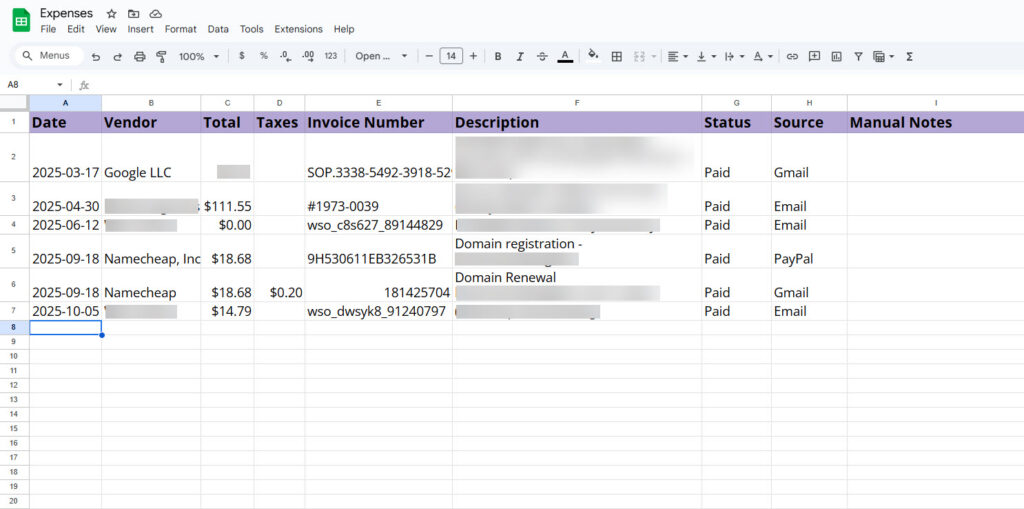
This is what your receipts/expenses log will look like…neat, searchable, and CPA-approved.
You’ve got receipts piling up and tax season coming.
Why wait to feel organized?
Take Expense Tracking Off Your Plate
This isn’t a tool that adds more to your plate. It’s one that helps you clear it.
You don’t need to be organized. This Tracker will organize for you!
How to Access Your Tracker
- Link to your Receipt Auto-Tracker is delivered upon purchase
- Works with a free or paid Gmail/Google Workspace
Hi there, I’m Kimberly Charron
I’m a Certified Online Business Manager and Business Process Specialist who helps overwhelmed solopreneurs and small business owners reclaim their time and focus on what they love most, growing their business through their genius work. Clients call me the Tech Tool Queen because I make systems and tools simple, powerful, and even fun.
I’m using this tracker myself and my CPA is going to love that I’m more organized this year!


Got Questions?
FAQs
Do I need to know how to code or use AI tools?
Nope! This is 100% beginner-friendly. Everything is provided for you. Follow the simple setup guide. No coding or tech skills required.
Will this work with my email setup?
This system is built for Google accounts (Gmail, Drive & Sheets). If you use a different platform, it won’t be compatible at this time, but a Google account is free and easy to set up if you’d like to create a business inbox specifically for receipts.
Do I need a paid Gmail/Google Workspace account?
No, you can use this with a free Google account.
Will this actually save me time?
Yes! Once it’s set up, the system runs in the background weekly. No more digging through your inbox. Everything’s organized for you automatically.
Can I use this for multiple businesses or clients?
You can duplicate the template for your own use across your own multiple businesses. If you’re a VA, OBM, or bookkeeper wanting to use this for clients, just purchase a copy for each use OR contact me for a multi-use license. Better yet, recommend your clients purchase their own copy. You can join the affiliate program (see below)????
What if I get stuck during setup?
The setup guide walks you through everything step by step, but if you hit a snag, you can reach out for help to me at kimberly@kimberlycharron.com. I’ve got your back.
Is this secure? Where is my data stored?
Yes, your receipts and data stay in your own Google Drive.
Have a question I haven’t answered?
If you have any questions about the tracker, email me at kimberly@kimberlycharron.com. I’m happy to help and will get back to you ASAP.
No more digging through your inbox. No more tax-time stress.
Let this system do the work — and get your time (and sanity) back.
Get your tracker + bonus Year-End Expense Review Checklist!
Love this? Want to Support My Creations & Make $? Become an Affiliate!
Sign up to become an affiliate of Kimberly Charron’s products & courses and share this amazing deal with your friends! 50% commission.